Table of Content
- Introduction
- Instalasi
- Config
- Instal laravel echo
- Config Websockets
- Config Broadcasting
- Buat Event
- Route
- Frontendnya
Tested on Laravel 7.
Requirements:
"beyondcode/laravel-websockets": "^2.0",
"pusher/pusher-php-server": "~3.0",
Introduction
Gue membuat jurnal ini karena ada project yg diharuskan menggunakan websocket. Project TMS (Transportation Management System). Perlu di note bahwa kita tidak perlu membuat akun pusher. Karena dengan menggunakan beyond/laravel-websockets sudah cukup.
Instalasi
Untuk lengkapnya lihat disini: https://beyondco.de/docs/laravel-websockets/getting-started/installation
Config
.env
PUSHER_APP_ID=12345
PUSHER_APP_KEY=QWERTY
PUSHER_APP_SECRET=ASDFGH
PUSHER_APP_CLUSTER=mt1

MIX_PUSHER_APP_KEY="${PUSHER_APP_KEY}"
MIX_PUSHER_APP_CLUSTER="${PUSHER_APP_CLUSTER}"
Instal laravel echo
resources/js/laravel-echo.js
import Echo from 'laravel-echo';

window.Pusher = require('pusher-js');

window.Echo = new Echo({
  broadcaster: 'pusher',
  key: process.env.MIX_PUSHER_APP_KEY,
  cluster: process.env.MIX_PUSHER_APP_CLUSTER,
  forceTLS: false,
  wsHost: window.location.hostname,
  wsPort: 6001
});
Versinya: “laravel-echo”: “^1.12.1”,
Jangan lupa npm run dev
Config Websockets
config/websockets.php
<?php

use BeyondCode\LaravelWebSockets\Dashboard\Http\Middleware\Authorize;

return [

    /*
     * Set a custom dashboard configuration
     */
    'dashboard' => [
        'port' => env('LARAVEL_WEBSOCKETS_PORT', 6001),
    ],

    /*
     * This package comes with multi tenancy out of the box. Here you can
     * configure the different apps that can use the webSockets server.
     *
     * Optionally you specify capacity so you can limit the maximum
     * concurrent connections for a specific app.
     *
     * Optionally you can disable client events so clients cannot send
     * messages to each other via the webSockets.
     */
    'apps' => [
        [
            'id' => env('PUSHER_APP_ID'),
            'name' => env('APP_NAME'),
            'key' => env('PUSHER_APP_KEY'),
            'secret' => env('PUSHER_APP_SECRET'),
            'path' => env('PUSHER_APP_PATH'),
            'capacity' => null,
            'enable_client_messages' => false,
            'enable_statistics' => true,
        ],
    ],

    /*
     * This class is responsible for finding the apps. The default provider
     * will use the apps defined in this config file.
     *
     * You can create a custom provider by implementing the
     * `AppProvider` interface.
     */
    'app_provider' => BeyondCode\LaravelWebSockets\Apps\ConfigAppProvider::class,

    /*
     * This array contains the hosts of which you want to allow incoming requests.
     * Leave this empty if you want to accept requests from all hosts.
     */
    'allowed_origins' => [
        //
    ],

    /*
     * The maximum request size in kilobytes that is allowed for an incoming WebSocket request.
     */
    'max_request_size_in_kb' => 250,

    /*
     * This path will be used to register the necessary routes for the package.
     */
    'path' => 'laravel-websockets',

    /*
     * Dashboard Routes Middleware
     *
     * These middleware will be assigned to every dashboard route, giving you
     * the chance to add your own middleware to this list or change any of
     * the existing middleware. Or, you can simply stick with this list.
     */
    'middleware' => [
        'web',
        Authorize::class,
    ],

    'statistics' => [
        /*
         * This model will be used to store the statistics of the WebSocketsServer.
         * The only requirement is that the model should extend
         * `WebSocketsStatisticsEntry` provided by this package.
         */
        'model' => \BeyondCode\LaravelWebSockets\Statistics\Models\WebSocketsStatisticsEntry::class,

        /**
         * The Statistics Logger will, by default, handle the incoming statistics, store them
         * and then release them into the database on each interval defined below.
         */
        'logger' => BeyondCode\LaravelWebSockets\Statistics\Logger\HttpStatisticsLogger::class,

        /*
         * Here you can specify the interval in seconds at which statistics should be logged.
         */
        'interval_in_seconds' => 60,

        /*
         * When the clean-command is executed, all recorded statistics older than
         * the number of days specified here will be deleted.
         */
        'delete_statistics_older_than_days' => 60,

        /*
         * Use an DNS resolver to make the requests to the statistics logger
         * default is to resolve everything to 127.0.0.1.
         */
        'perform_dns_lookup' => false,
    ],

    /*
     * Define the optional SSL context for your WebSocket connections.
     * You can see all available options at: <http://php.net/manual/en/context.ssl.php>
     */
    'ssl' => [
        /*
         * Path to local certificate file on filesystem. It must be a PEM encoded file which
         * contains your certificate and private key. It can optionally contain the
         * certificate chain of issuers. The private key also may be contained
         * in a separate file specified by local_pk.
         */
        'local_cert' => env('LARAVEL_WEBSOCKETS_SSL_LOCAL_CERT', null),

        /*
         * Path to local private key file on filesystem in case of separate files for
         * certificate (local_cert) and private key.
         */
        'local_pk' => env('LARAVEL_WEBSOCKETS_SSL_LOCAL_PK', null),

        /*
         * Passphrase for your local_cert file.
         */
        'passphrase' => env('LARAVEL_WEBSOCKETS_SSL_PASSPHRASE', null),
    ],

    /*
     * Channel Manager
     * This class handles how channel persistence is handled.
     * By default, persistence is stored in an array by the running webserver.
     * The only requirement is that the class should implement
     * `ChannelManager` interface provided by this package.
     */
    'channel_manager' => \BeyondCode\LaravelWebSockets\WebSockets\Channels\ChannelManagers\ArrayChannelManager::class,
];
Config Broadcasting
config/broadcasting.php
<?php

return [

    /*
    |--------------------------------------------------------------------------
    | Default Broadcaster
    |--------------------------------------------------------------------------
    |
    | This option controls the default broadcaster that will be used by the
    | framework when an event needs to be broadcast. You may set this to
    | any of the connections defined in the "connections" array below.
    |
    | Supported: "pusher", "redis", "log", "null"
    |
    */

    'default' => env('BROADCAST_DRIVER', 'null'),

    /*
    |--------------------------------------------------------------------------
    | Broadcast Connections
    |--------------------------------------------------------------------------
    |
    | Here you may define all of the broadcast connections that will be used
    | to broadcast events to other systems or over websockets. Samples of
    | each available type of connection are provided inside this array.
    |
    */

    'connections' => [

        'pusher' => [
            'driver' => 'pusher',
            'key' => env('PUSHER_APP_KEY'),
            'secret' => env('PUSHER_APP_SECRET'),
            'app_id' => env('PUSHER_APP_ID'),
            'options' => [
                'cluster' => env('PUSHER_APP_CLUSTER'),
                'host' => '127.0.0.1',
                'port' => 6001,
                'scheme' => 'http',
                'encrypted' => false,
            ],
        ],
        // 'pusher' => [
        //     'driver' => 'pusher',
        //     'key' => env('PUSHER_APP_KEY'),
        //     'secret' => env('PUSHER_APP_SECRET'),
        //     'app_id' => env('PUSHER_APP_ID'),
        //     'options' => [
        //         'cluster' => env('PUSHER_APP_CLUSTER'),
        //         'useTLS' => true,
        //     ],
        // ],

        'redis' => [
            'driver' => 'redis',
            'connection' => 'default',
        ],

        'log' => [
            'driver' => 'log',
        ],

        'null' => [
            'driver' => 'null',
        ],

    ],

];
Buat Event
php artisan make:event Tms/HelloWorld
<?php

namespace App\Events\Tms;

use Illuminate\Broadcasting\Channel;
use Illuminate\Broadcasting\InteractsWithSockets;
use Illuminate\Broadcasting\PresenceChannel;
use Illuminate\Broadcasting\PrivateChannel;
use Illuminate\Contracts\Broadcasting\ShouldBroadcastNow;
use Illuminate\Foundation\Events\Dispatchable;
use Illuminate\Queue\SerializesModels;

class HelloWorld implements ShouldBroadcastNow
{
    use Dispatchable, InteractsWithSockets, SerializesModels;
    public $message;

    public function __construct()
    {
        $this->message = 'Hello from server!';
    }

    // Untuk channel
    public function broadcastOn()
    {
        return new Channel('HelloWorld');
    }

    // untuk listen
    public function broadcastAs()
    {
        return 'hello-world';
    }
}
NOTE: Perlu diperhatikan bahwa broadcastOn untuk penamaan channel sedangkan broadcastAs untuk penamaan listen di blade nya.
Route
<?php

use App\Events\Tms\HelloWorld;
use Illuminate\Support\Facades\Route;

Route::get('/tms/testing-websocket', function(){
    event(new HelloWorld());
});
Frontendnya
@push('scripts')
<script src="{{ asset('js/laravel-echo.js') }}"></script>
<script>
Echo.connector.pusher.connection.bind('connected', () => {
    console.log('WebSocket connected');
});

Echo.channel('HelloWorld').listen('.hello-world', (e) => {
    console.log("Listener triggered");
    alert("Hello world");
});
</script>
@endpush
Perlu diperhatikan nama listen harus diawali titik.
Note: harus ada titik di nama listen frontend
Berikut dokumentasinya:
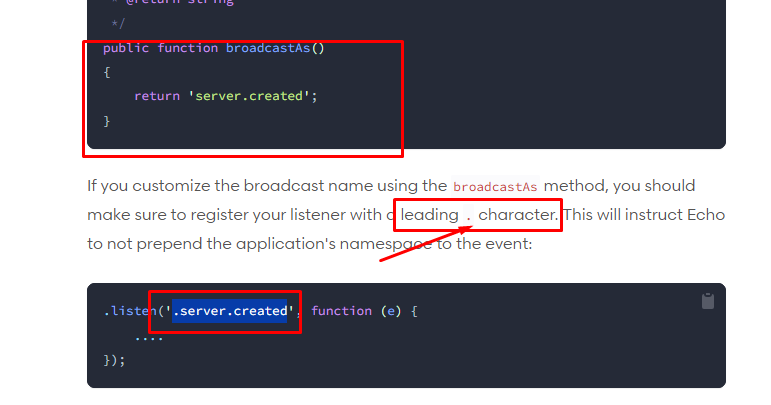
https://laravel.com/docs/7.x/broadcasting
Date: 28-12-202